As a foreigner, can I use mobile payment?
Detailed answers on whether foreign tourists can use Alipay and WeChat Pay in China, with step-by-step instructions for linking international bank cards, usage methods and important notes.
7.2 As a foreigner, can I use mobile payment?
For international visitors taking their first trip to China, this may be one of your biggest questions. Faced with QR codes everywhere on the streets, you might wonder: As a foreigner, can I join this mobile payment wave? The answer is yes, and the entire process is much simpler and smoother than you might imagine.
China's mobile payment ecosystem is mainly built by two giants – Alipay and WeChat Pay. In the past, they primarily served users with Chinese domestic bank cards, but that's now history. Today, both platforms have opened their doors to international users and fully support linking overseas mainstream credit cards. This guide will walk you through the setup step by step and share some key tips to ensure your payment experience in China is easy and worry-free.
Core tools: Alipay and WeChat Pay
Mastering these two apps is like holding the key to traveling smoothly in China. Although their functions are highly similar, it's recommended that you set up both before your trip, just in case. The core of linking is to associate your Visa, Mastercard, JCB, Diners Club or Discover credit card with your payment account.
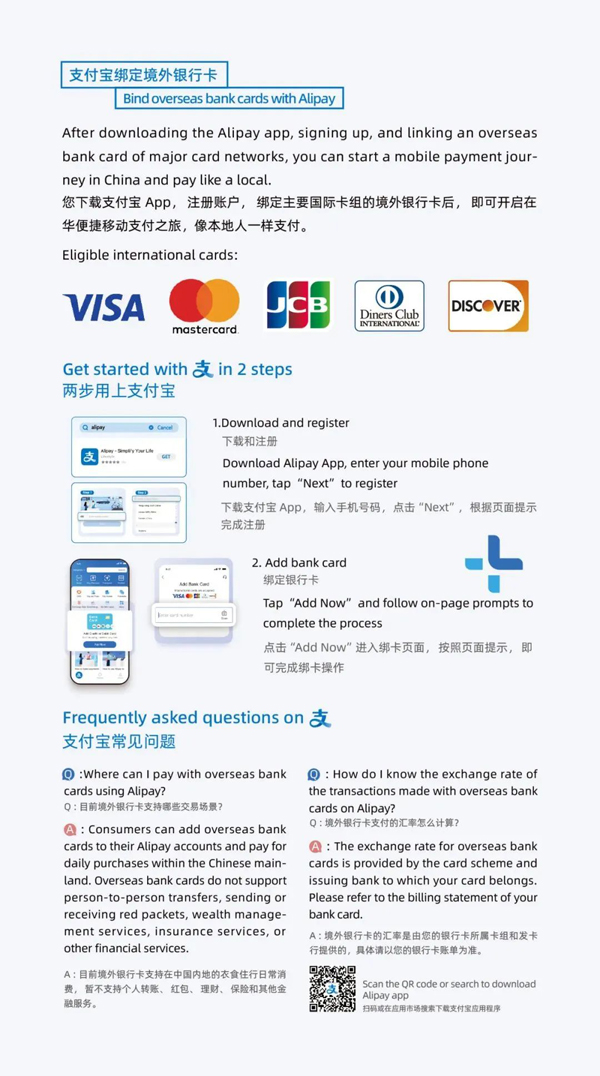
Alipay: Step-by-step guide to linking and using
Step 1: Download the app and create an account
Before arriving in China, you can download "Alipay" from Google Play or App Store. After installation, be sure to register with your overseas phone number. The system will automatically recognize your international user status and open the corresponding service channels for you.
Step 2: Link your international credit card
This is the core step of the entire process. The operation path is as follows:
- Tap the bottom right corner Me → Bank Cards.
- Tap + Add Card.
- Enter the card number, expiration date (MM/YY) and security code (CVV).
The entire process has English guidance, just follow the prompts to complete the linking.
Step 3: Understand and start paying
After successful linking, daily purchases can be completed in two ways:
- You scan the merchant (Scan): Tap Scan on the homepage, point at the merchant's QR code, enter the amount and confirm payment. Common in scenarios like small vendors and taxis.
- Merchant scans you (Pay/Collect): Tap Pay/Collect on the homepage to generate a payment code for the merchant to scan and complete payment. Common in supermarkets, restaurants, etc.
Expert tips and notes
- Transaction limits: Single transaction limit $5,000 USD, annual cumulative limit $50,000 USD.
- Fees: Transactions under ¥200 are usually fee-free; transactions over ¥200 have a fee of about 3%, which will be clearly displayed on the payment confirmation page.
WeChat Pay: Payment within social networking
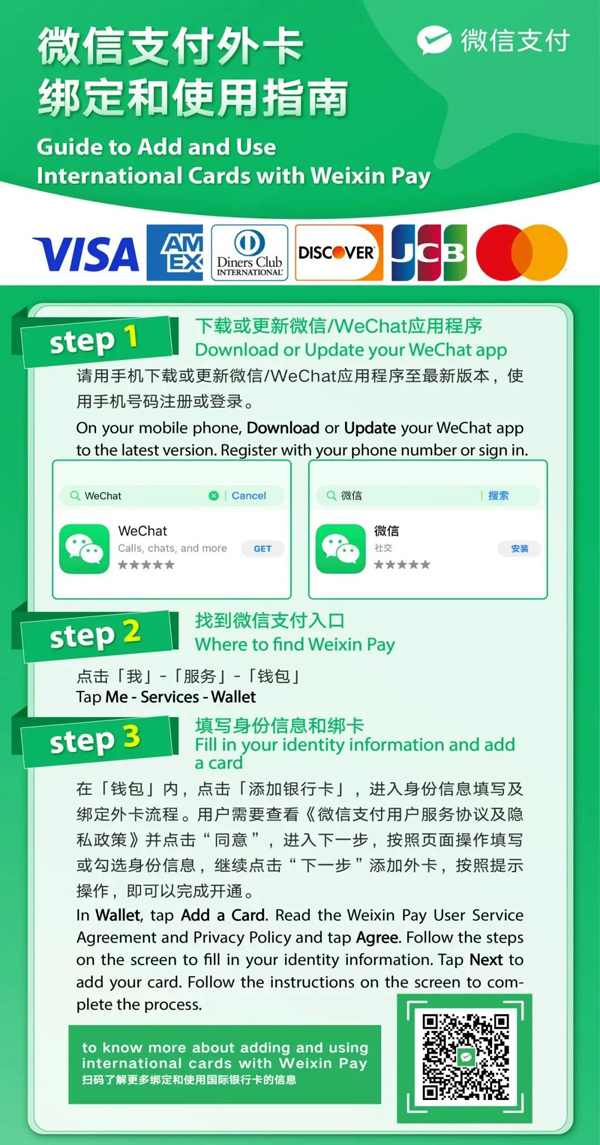
Step 1: Prepare your WeChat account
Make sure you've downloaded "WeChat" and registered an account with an overseas phone number.
Step 2: Activate wallet and link bank card
- Tap the bottom right corner Me → Services → Wallet.
- On the "Wallet" page, select Cards → Add a Card.
- Enter your international credit card information. After successfully adding it, the wallet function will be activated.
Step 3: Payment operations
WeChat Pay's process is almost identical to Alipay:
- Scan to pay (Scan): Scan the merchant's QR code to pay.
- Payment code (Money): Generate your personal payment code for the merchant to scan.
UnionPay system: Connecting your local wallet to China
In addition to the two major platforms above, UnionPay provides international tourists with two equally convenient, and even more integrated, payment paths.
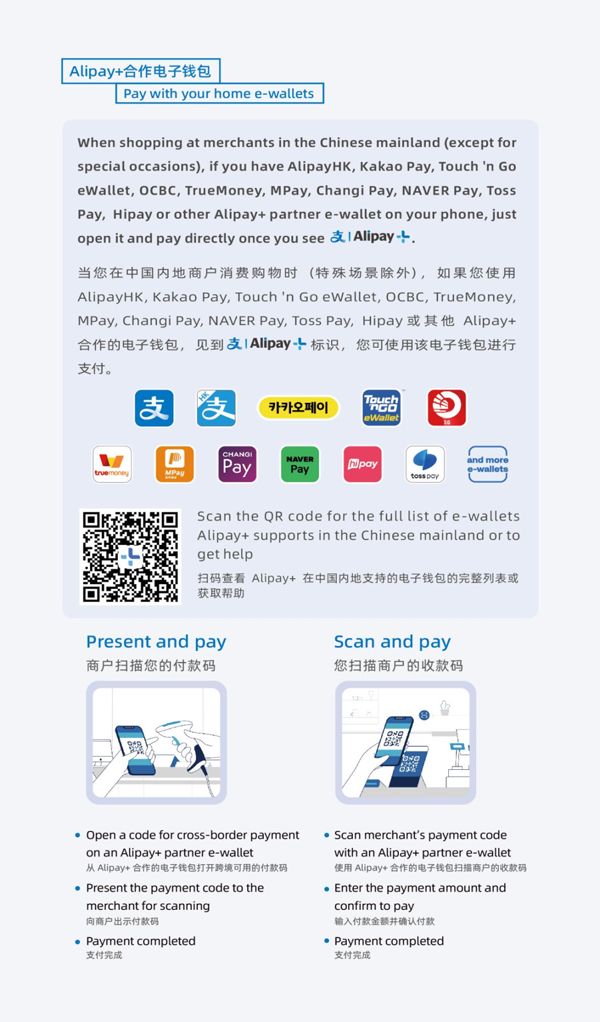
Option 1: Use your home country's e-wallet to pay directly
For tourists from specific countries and regions, this is the most seamless experience. You don't need to download any new apps – just use the e-wallet you're already very familiar with in your home country. This is thanks to UnionPay's extensive international cooperation network.
Tourists from Hong Kong, Macau, Southeast Asia, Japan, South Korea, Mongolia and other places can check whether your local payment app (such as Hong Kong's Octopus, South Korea's Naver Pay, Thailand's K PLUS, etc.) already supports the UnionPay international network.
If supported, you just need to ensure that your wallet has a linked bank card (usually a UnionPay card), and you can directly scan and pay wherever you see UnionPay QR codes in mainland China.
This is not only convenient but also has advantages in privacy protection, as you don't need to provide personal information to new platforms.
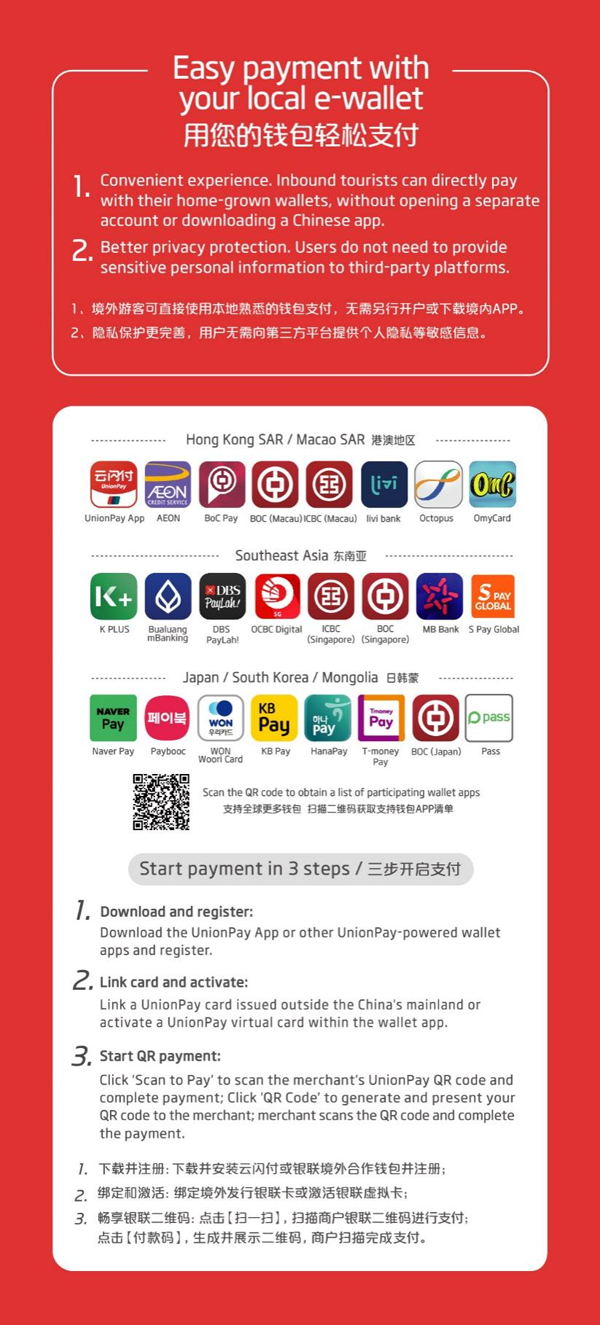
Option 2: Download the UnionPay app and apply for a "Tour Card"
If your region doesn't have the above partner wallets, or if you want a more powerful "one-stop" payment tool, downloading UnionPay's official UnionPay (Cloud QuickPass) app will be your best choice. Its "Tour Card" feature designed specifically for tourists is very powerful.
Four-step operation:
- Register an account: Download the "UnionPay" app from the app store and easily complete registration with your international phone number.
- Apply for a Tour Card: In the app, search for "Tour Card" (or "优计划旅行卡"), and follow the instructions to apply for a virtual prepaid card using your passport and other information.
- Top up the card: After successful application, you can use your own international bank card (such as Visa, Mastercard, etc.) to top up this virtual Tour Card. According to the instructions, top-ups are fee-free, and the exchange rate is calculated according to the day's standard.
- Start paying: This is the core advantage of the UnionPay app – super compatibility. You can not only use it to scan UnionPay QR codes, but also to scan Alipay and WeChat Pay merchant QR codes. This means that having one UnionPay app is equivalent to accessing China's most mainstream payment channels. At the same time, it can also generate payment codes for POS machine scanning.

UnionPay's solutions cover all daily consumption scenarios from dining, shopping, transportation to accommodation and entertainment, but do not support non-consumption functions such as transfers and wealth management.
Conclusion: Set up in advance, travel worry-free
As a foreign tourist, you absolutely can and should use mobile payments – it will greatly enhance your travel convenience and experience.
Professional recommendations:
- Complete the download and credit card linking of Alipay and WeChat before departure.
- Try one or two small payments (such as transactions supported by international websites) to test the function.
- After arriving in China, you can "scan and pay" like a local and easily start your journey.